
Automatically Controlled Member Milestones
Learn how Lurkr can automatically celebrate a milestone with you
Why Would You Need This?
Celebrating a member milestone is a super simple and social activity. Whether you're celebrating 100 members or 100,000, it's just as a momentous occasion as any. By celebrating and rewarding the user who joined as your nth member, you can always set a new goal to reach, a new level of growth to achieve. Automating this process is quick and simple, and the possibilities are endless!
Video Tutorial
We currently do not have a video tutorial for this guide just yet, check back later!
Enabling Milestones
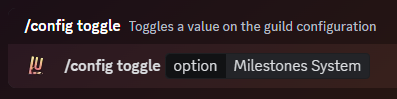
The first step is to enable the milestone feature in your Lurkr settings.
This acts as a useful switch if you want to stop using milestones, but want to keep all of your configured settings we will get into later on.
To enable it, type the following command:
Setting the Milestones Channel
The next step is to set a milestones channel, where all of your automated milestone announcements will be sent in!
This can be a regular text channel or if you have a community enable server, this can also be an announcement channel.
To set your channel, type the following command:

Setting the Milestones Interval
This next step is quite an important one because now you can choose at what member count you want your milestone to be triggered at.
The interval is the number of members between each milestone, and by default it is set to 100. This means that every 100 members, a milestone is triggered, such as 200, 300, 400, etc.
The milestone interval can be any number within reason as long as it is a multiple of 5. Conceivably, the interval can be set to 5, or it can be set to 100,000.
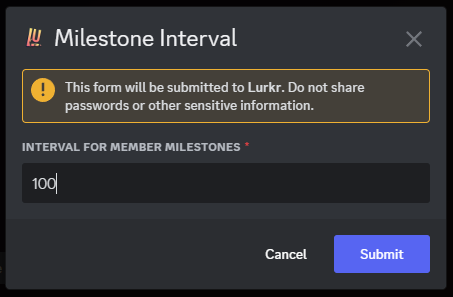
To set your interval, type the following command:

A modal-box will then appear, in which you can then enter the interval you want to assign.
Setting the Milestones Message
Next up, you can also customize your milestone message, which is the message that is sent when a milestone is reached.
By default, the message looks as follows:
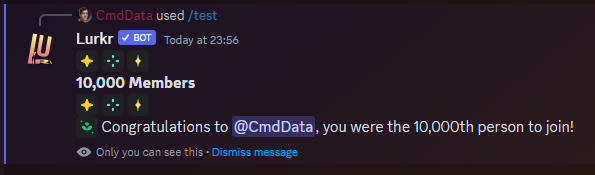
You may include any number of emojis (As long as the bot can access them), formatting, line breaks, special characters and even role mentions as long as it is within the 1,800-character limit.
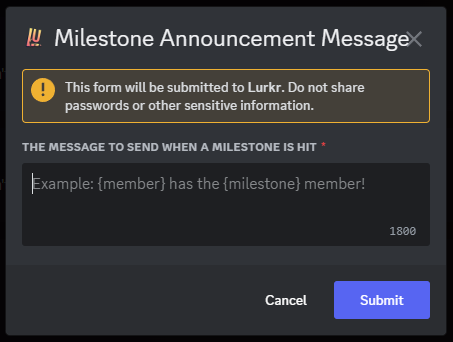
To set your milestone message, type the following command:

A modal-box will then appear, in which you can then enter the message you want the bot to send.
If you are including a role mention in your message, make sure that Lurkr has permission to mention that role, otherwise it won't work and the message might turn out looking very ugly.
There are several tags you can include in your Milestone message. These parameters will be replaced with the appropriate information when the Milestone message is sent.
You must include the brackets in your message for the tags to show up!
| Information | Tag |
|---|---|
| User Mention (@User) | {user} |
| User Tag (User#1234) | {user.tag} |
| Username (User) | {user.username} |
| User Discriminator (1234) | {user.discriminator} |
| User ID (99787644430475264) | {user.id} |
| Server Name (My Cool Server) | {guild.name} |
| Server Name (My Cool Server) | {guild} |
| Server ID (493351982887862283) | {guild.id} |
| Server Member Count (1,234) | {guild.memberCount} |
| Milestone Achieved (100) | {milestone} |
Conditional Variables
Just like with level up messages, you can show different parts of your milestone message depending on which milestone was reached.
Wrap a section in {#milestone.N}…{/milestone.N} to only show it when the server hits exactly the N-th member,
and use {^milestone.N}…{/milestone.N} for the opposite check. Write N as a plain number ({#milestone.1000}, not
{#milestone.1,000}) — even though {milestone} itself is displayed with thousands separators.
Different messages for specific milestones
Stack one section per milestone — each is independent and only fires for its own number:
🎉 {user} is our {milestone}th member!
{#milestone.500}Thanks for getting us to 500 — drinks on us!{/milestone.500}
{#milestone.1000}Welcome to the four-digit club 🎂{/milestone.1000}
{#milestone.10000}10k members! This is wild ❤️{/milestone.10000}
The first line (🎉 {user} is our {milestone}th member!) is shown for every milestone. The lines inside
{#milestone.N} blocks only appear when their specific milestone is hit.
A separate fallback message
If you want a default that only shows when none of the specific milestones match, nest a negative section for each milestone you've configured:
{#milestone.500}Thanks for getting us to 500 — drinks on us!{/milestone.500}
{#milestone.1000}Welcome to the four-digit club 🎂{/milestone.1000}
{^milestone.500}{^milestone.1000}🎉 {user} is our {milestone}th member!{/milestone.1000}{/milestone.500}
The {^…} sections must be nested (closing tags in reverse order, like brackets), and you need one negative entry
per milestone that has its own message. See the
level up messages guide for a deeper
walkthrough.
Setting the Milestones Role
Lastly, you can also reward users who conveniently joined at exactly the right time by granted them a role or several.
You can enter as many roles as your current server plan will allow. You can check the limits on the Premium Perks page!

Final Words
And that's it! You've successfully created Automatically Assigning Roles with Lurkr!
If you need any more assistance with Lurkr, check out the rest of this documentation or join our support server to talk to an actual human!
Last updated on